Beyond your link and your website, you have a professional profile in the psychologists section of hanamind.es. It's a showcase built so new patients can find you, see who you are and book an appointment directly with you.
In short
Go to settings → Profile; that's where the Public profile lives: switch on Public profile visible, fill in your details and save. You appear on hanamind.es and patients find you and book directly. The appointment lands in your calendar on its own.
Go to settings → Profile

Click the settings icon (⚙) in the top right and go to Profile. There you'll find the Public profile section.
Switch on the Public profile and complete it
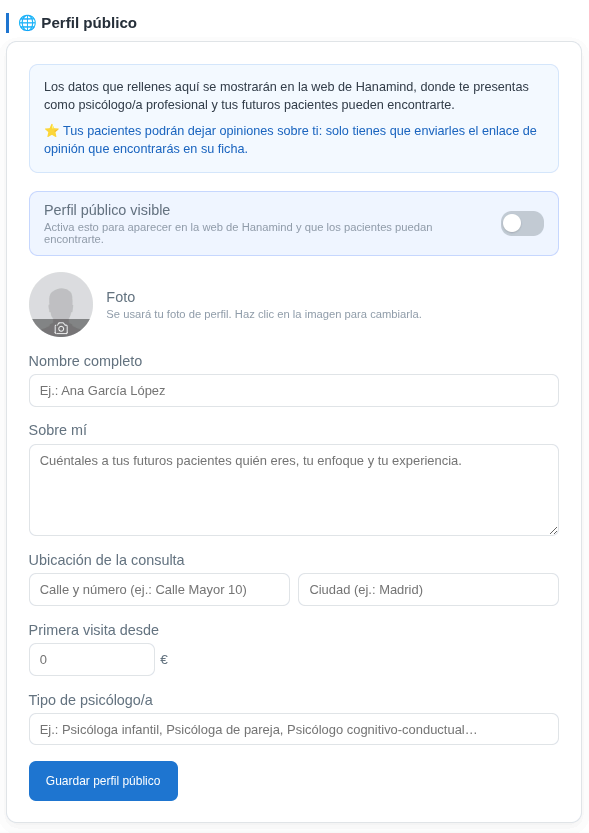
Turn on the Public profile visible switch to appear on the Hanamind website. Then complete your photo, your name, the About me, your practice location, the first-visit price and your type of psychologist. When you're done, click Save public profile.
Patients find you and book
Your profile appears in the psychologists section of hanamind.es, with better visibility in search engines. A new patient can read your introduction, see your availability and book directly from there.
The appointment shows up in your calendar
When someone books from your profile, the appointment is added to your calendar with their details, ready to work with. No middlemen and no per-patient commissions.
Bonus: patient reviews
Your patients can leave reviews about you on your profile. You just have to send them the review link you'll find in their record.
Three ways, one result
Link from the record, widget on your website and profile on hanamind.es don't compete with each other: they're three doors into the same calendar. Use whichever fits each patient best and let them book on their own.
Your profile on hanamind.es works for you: it gives you visibility and turns whoever discovers you into a booked appointment, without you having to answer a single message.