Your patients’ reviews build trust with people who are looking for you. From each patient’s record you can send them a review link so they can rate you. Nothing is published until you’ve checked it.
In short
Send the review link from the patient’s record. When they leave a review, it appears under settings → Profile → Reviews as pending review. Approve or reject it. Until you approve it, it doesn’t appear in the psychologists directory. Only approved reviews appear there.
Send the review link from the record
Open the patient’s record. You’ll find the Review link for your patient block, with three ways to send it: Send by WhatsApp, Send by email or Copy link.

The patient leaves a review
Your patient opens the link and leaves a review about you. Only you receive it: it isn’t published yet, and it stays pending your review.
Open the Reviews tab
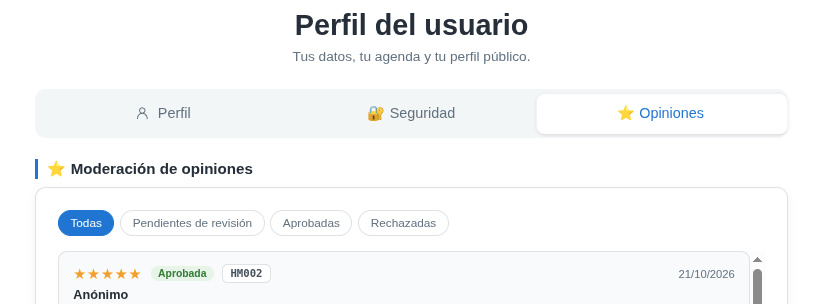
Go to settings → Profile and click the ⭐ Reviews tab, at the top right, next to Profile and Security.

Moderate each review: approve or reject
Under Review moderation you have the filters All, Pending review, Approved and Rejected. New reviews appear under Pending review. Check each one and decide:
- Approve: the review is published and can appear in the psychologists directory.
- Reject: it is never published.
Until you approve, it isn't visible
A review pending review doesn’t appear in the psychologists directory on hanamind.es. It only appears once you approve it.
Make it visible in the directory
For your approved reviews to show, the Public profile must be on (Public profile visible switch). We explain it in the guide From your profile on hanamind.es.
You decide what's visible
Nothing appears online without your approval. If a review doesn’t fit, reject it and it won’t be published.