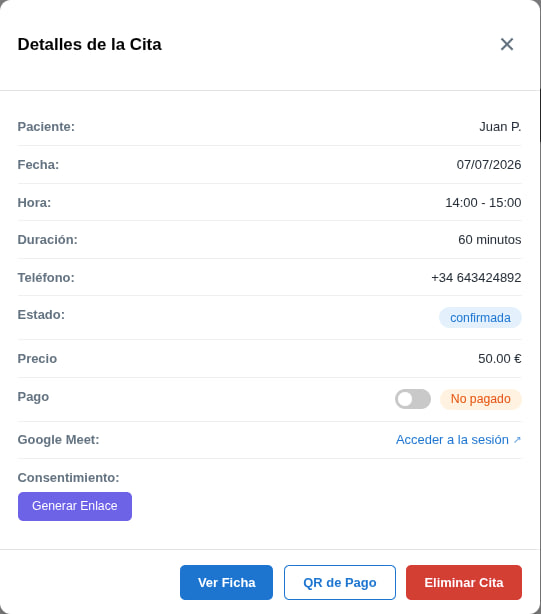
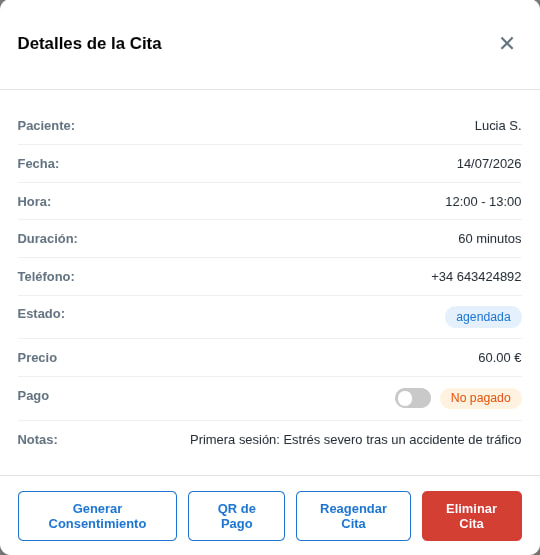
Once you have an appointment in your calendar, you can manage it fully without leaving it. Click on any appointment to open its Details.
From that window you can:
- Join the video call (if it's online): click Join session to open Google Meet. The patient also receives the link by email.
- Reschedule the appointment: the Reschedule appointment button only appears if the appointment hasn't happened yet; click it to change the day or time. If the appointment has already happened, that button is not shown.
- Generate the consent form: if it's the patient's first time and they haven't signed it yet, click Generate consent so they can fill it in with you during the session. (You can also send it beforehand by other means).
- Generate a payment QR: if they haven't paid yet, click Payment QR so they can pay in person. (There are other payment methods we'll cover in another guide).
- View the patient's record: click View record to open the Treatment record, where you can see their personal and social data, the history of previous sessions and much more. Available once the patient has signed the consent form.
- Delete the appointment: you can delete it at any time, whether it has happened or not.
Two things to keep in mind
The Payment QR button only appears and works if you have Stripe activated. And the video call link is only generated if you have Google Calendar activated; without it, online appointments won't have a Meet link.